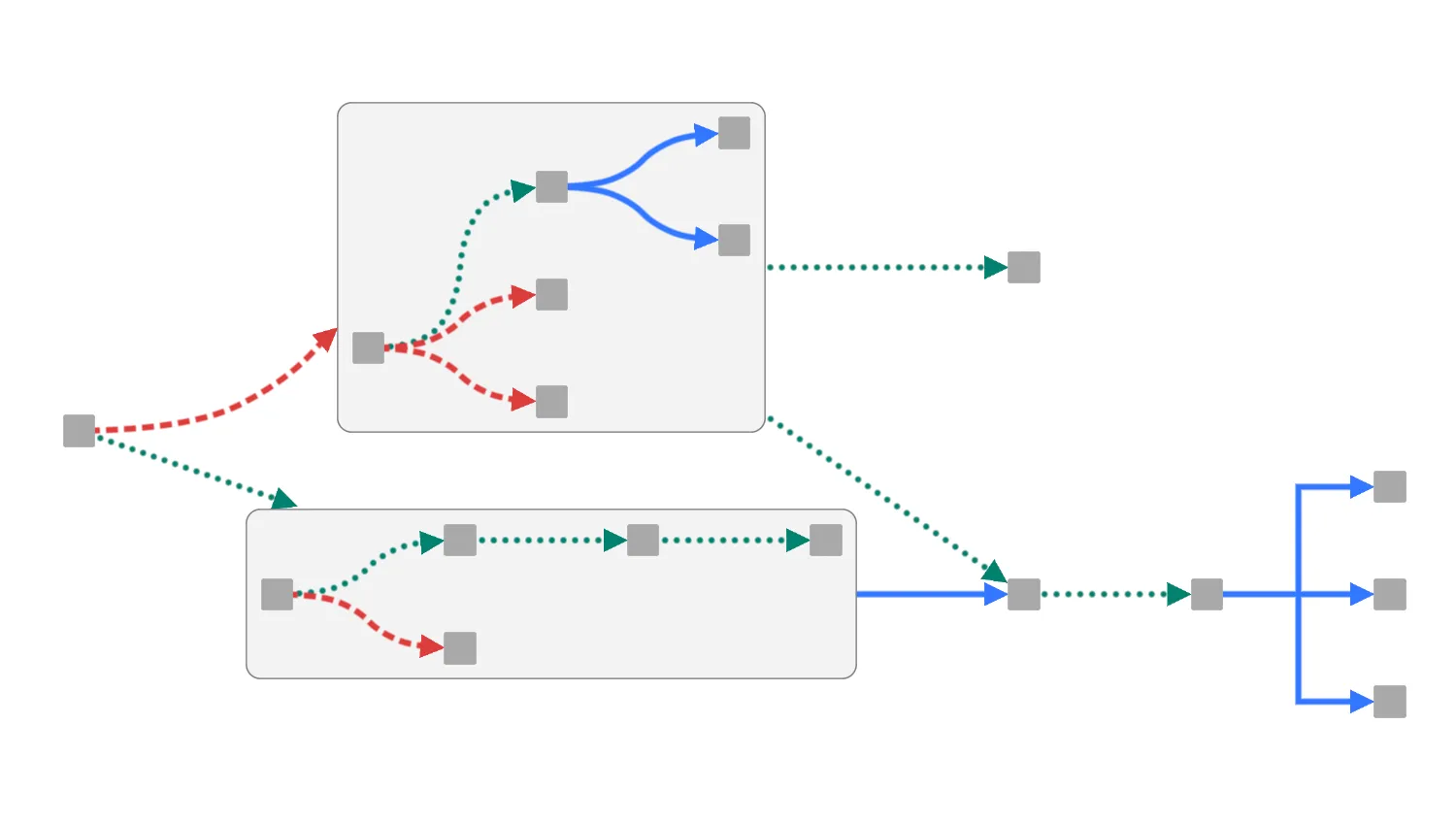
KeyLines provides different link shapes to show connections in the most intuitive way. Multiple link shapes can be used together in the same chart.
This demo shows how to use customised link shapes for different sets of links, and specify whether they override combo link shapes.
The chart shows three sets of coloured links, each with its own link shape.
It also has two combos using a sequential arrangement with curved links.
By default the chart shows the combos with curved links, while the remaining links have the specified, colour-specific, link shapes. Check the box to override the 'curved' setting for combo links, and so use the custom link shapes instead.
See also
Documentation: Link shapes
Demos: Cloud Security
Key functions used:
import KeyLines from "keylines";
import { comboIds, data } from "./data";

const customiseInComboCheckbox = document.getElementById("customise-in-combos");

let chart;

function getLinkShapeForColour(colour) {
  return document.querySelector(`#${colour}-link-shape-btn-group .active`)
    .value;
}

function setLinkShapes() {
  const shape = {
    red: getLinkShapeForColour("red"),
    green: getLinkShapeForColour("green"),
    blue: getLinkShapeForColour("blue"),
  };
  const setOnChildLinks = customiseInComboCheckbox.checked;
  const linkShapesToSet = [];
  chart.each({ type: "link", items: "all" }, (l) => {
    if (!l.parentId || setOnChildLinks) {
      linkShapesToSet.push({
        id: l.id,
        linkShape: { name: shape[l.d.colour] },
      });
    } else {
      linkShapesToSet.push({ id: l.id, linkShape: null });
    }
  });
  chart.setProperties(linkShapesToSet);
}

async function layout() {
  await chart.layout("sequential", {
    orientation: "right",
    stretchType: "auto",
  });
}

// Modify the default combo double click behavior so that
// it still toggles the open state of the combo, but disables
// push-pull and runs a new layout instead
async function onDoubleClick({ id, preventDefault, button }) {
  if (!id || button !== 0) {
    return;
  }

  const comboApi = chart.combo();
  const combo = comboApi.isCombo(id) ? id : chart.getItem(id)?.parentId;

  if (combo) {
    const opts = { adapt: "none" };
    preventDefault();
    if (comboApi.isOpen(combo)) {
      await comboApi.close(combo, opts);
    } else {
      await comboApi.open(combo, opts);
    }
    await layout();
  }
}

function initialiseInteractions() {
  const shapeByColourButtons = document.querySelectorAll(
    ".link-shape-btn-group button",
  );
  shapeByColourButtons.forEach((button) => {
    button.addEventListener("click", () => {
      const colour = button.dataset.colour;
      const currentSelection = document.querySelector(
        `#${colour}-link-shape-btn-group .active`,
      );
      const currentShape = currentSelection.value;
      if (button.value !== currentShape) {
        currentSelection.classList.remove("active");
        button.classList.add("active");
        setLinkShapes();
      }
    });
  });
  customiseInComboCheckbox.addEventListener("change", setLinkShapes);

  // perform layout on combo open/close
  chart.on("double-click", onDoubleClick);
}

async function startKeyLines() {
  const options = {
    handMode: true,
    combos: { shape: "rectangle" },
    defaultStyles: { openCombos: { borderRadius: 10 } },
  };

  chart = await KeyLines.create({ container: "klchart", options });
  await chart.load(data);
  setLinkShapes();
  await chart.combo().open(comboIds);
  await chart
    .combo()
    .arrange(comboIds, {
      name: "sequential",
      orientation: "right",
      linkShape: "curved",
    });
  await layout();

  initialiseInteractions();
}

window.addEventListener("DOMContentLoaded", startKeyLines);const colours = {
green: "#048170",
red: "#DD3C3C",
blue: "#3377FF",
grey: "#A9A9A9",
};
export const comboIds = ["n2", "n3"];
const nodes = [
{
id: "n1",
type: "node",
},
{
id: "n2",
type: "node",
},
{
id: "n2-a",
type: "node",
parentId: "n2",
},
{
id: "n2-b",
type: "node",
parentId: "n2",
},
{
id: "n2-c",
type: "node",
parentId: "n2",
},
{
id: "n2-d",
type: "node",
parentId: "n2",
},
{
id: "n2-e",
type: "node",
parentId: "n2",
},
{
id: "n2-f",
type: "node",
parentId: "n2",
},
{
id: "n3",
type: "node",
},
{
id: "n3-a",
type: "node",
parentId: "n3",
},
{
id: "n3-b",
type: "node",
parentId: "n3",
},
{
id: "n3-c",
type: "node",
parentId: "n3",
},
{
id: "n3-d",
type: "node",
parentId: "n3",
},
{
id: "n3-e",
type: "node",
parentId: "n3",
},
{
id: "n4",
type: "node",
},
{
id: "n5",
type: "node",
},
{
id: "n6",
type: "node",
},
{
id: "n7",
type: "node",
},
{
id: "n8",
type: "node",
},
{
id: "n9",
type: "node",
},
];
nodes.forEach((n) => {
n.e = 0.4;
n.sh = "box";
n.borderRadius = 5;
n.c = colours.grey;
});
const links = [
{
id: "n1-n2-red",
type: "link",
w: 4,
id1: "n1",
id2: "n2",
c: colours.red,
ls: "dashed",
a2: true,
d: { colour: "red" },
},
{
id: "n2-a-n2-b-green",
type: "link",
w: 4,
id1: "n2-a",
id2: "n2-b",
c: colours.green,
ls: "dotted",
a2: true,
d: { colour: "green" },
},
{
id: "n2-a-n2-c-red",
type: "link",
w: 4,
id1: "n2-a",
id2: "n2-c",
c: colours.red,
ls: "dashed",
a2: true,
d: { colour: "red" },
},
{
id: "n2-a-n2-d-red",
type: "link",
w: 4,
id1: "n2-a",
id2: "n2-d",
c: colours.red,
ls: "dashed",
a2: true,
d: { colour: "red" },
},
{
id: "n2-b-n2-e-blue",
type: "link",
w: 4,
id1: "n2-b",
id2: "n2-e",
c: colours.blue,
a2: true,
d: { colour: "blue" },
},
{
id: "n2-b-n2-f-blue",
type: "link",
w: 4,
id1: "n2-b",
id2: "n2-f",
c: colours.blue,
a2: true,
d: { colour: "blue" },
},
{
id: "n1-n3-green",
type: "link",
w: 4,
id1: "n1",
id2: "n3",
c: colours.green,
ls: "dotted",
a2: true,
d: { colour: "green" },
},
{
id: "n3-a-n3-b-green",
type: "link",
w: 4,
id1: "n3-a",
id2: "n3-b",
c: colours.green,
ls: "dotted",
a2: true,
d: { colour: "green" },
},
{
id: "n3-b-n3-c-green",
type: "link",
w: 4,
id1: "n3-b",
id2: "n3-c",
c: colours.green,
ls: "dotted",
a2: true,
d: { colour: "green" },
},
{
id: "n3-c-n3-e-green",
type: "link",
w: 4,
id1: "n3-c",
id2: "n3-e",
c: colours.green,
ls: "dotted",
a2: true,
d: { colour: "green" },
},
{
id: "n3-a-n3-d-red",
type: "link",
w: 4,
id1: "n3-a",
id2: "n3-d",
c: colours.red,
ls: "dashed",
a2: true,
d: { colour: "red" },
},
{
id: "n3-n4-blue",
type: "link",
w: 4,
id1: "n3",
id2: "n4",
c: colours.blue,
a2: true,
d: { colour: "blue" },
},
{
id: "n2-n4-green",
type: "link",
w: 4,
id1: "n2",
id2: "n4",
c: colours.green,
ls: "dotted",
a2: true,
d: { colour: "green" },
},
{
id: "n2-n5-green",
type: "link",
w: 4,
id1: "n2",
id2: "n5",
c: colours.green,
ls: "dotted",
a2: true,
d: { colour: "green" },
},
{
id: "n4-n6-green",
type: "link",
w: 4,
id1: "n4",
id2: "n6",
c: colours.green,
ls: "dotted",
a2: true,
d: { colour: "green" },
},
{
id: "n6-n7-blue",
type: "link",
w: 4,
id1: "n6",
id2: "n7",
c: colours.blue,
a2: true,
d: { colour: "blue" },
},
{
id: "n6-n8-blue",
type: "link",
w: 4,
id1: "n6",
id2: "n8",
c: colours.blue,
a2: true,
d: { colour: "blue" },
},
{
id: "n6-n9-blue",
type: "link",
w: 4,
id1: "n6",
id2: "n9",
c: colours.blue,
a2: true,
d: { colour: "blue" },
},
];
export const data = {
type: "LinkChart",
items: [...nodes, ...links],
};<!doctype html>
<html lang="en">
<head>
<meta charset="utf-8">
<title>Mixed Link Shapes</title>
<link rel="stylesheet" type="text/css" href="@ci/theme/kl/css/keylines.css">
<link
rel="stylesheet"
type="text/css"
href="@ci/theme/kl/css/minimalsdk.css"
>
<link
rel="stylesheet"
type="text/css"
href="@ci/theme/kl/css/sdk-layout.css"
>
<link rel="stylesheet" type="text/css" href="@ci/theme/kl/css/demo.css">
<link
rel="stylesheet"
type="text/css"
href="@ci/theme/kl/css/examples-chrome.css"
>
<link rel="stylesheet" href="./style.css">
</head>
<body>
<div class="chart-wrapper demo-cols">
<div id="lhs" class="flex1">
<div
id="lhsVisual"
class="toggle-content is-visible"
style="width: 100%; height: 100%"
>
<div id="klchart" class="klchart"></div>
</div>
</div>
<div class="rhs citext" id="demorhscontent">
<div class="tab-content-panel">
<div id="controlsTab" class="toggle-content is-visible tabcontent">
<p>
Select a link shape for each set of coloured links. Choose whether
they override the combo link shape, which is set to 'curved'.
</p>
<form id="rhsForm" autocomplete="off" onsubmit="return false;">
<div class="cicontent">
<fieldset>
<legend>Link Shape Customisation</legend>
<div class="btn-row">
<p>Red</p>
<div
class="link-shape-btn-group btn-group"
id="red-link-shape-btn-group"
>
<button
class="btn btn-kl"
type="button"
data-colour="red"
value="direct"
>
Direct
</button><button
class="btn btn-kl active"
type="button"
data-colour="red"
value="curved"
>
Curved
</button><button
class="btn btn-kl"
type="button"
data-colour="red"
value="angled"
>
Angled
</button>
</div>
</div>
<div class="btn-row">
<p>Green</p>
<div
class="link-shape-btn-group btn-group"
id="green-link-shape-btn-group"
>
<button
class="btn btn-kl active"
type="button"
data-colour="green"
value="direct"
>
Direct
</button><button
class="btn btn-kl"
type="button"
data-colour="green"
value="curved"
>
Curved
</button><button
class="btn btn-kl"
type="button"
data-colour="green"
value="angled"
>
Angled
</button>
</div>
</div>
<div class="btn-row">
<p>Blue</p>
<div
class="link-shape-btn-group btn-group"
id="blue-link-shape-btn-group"
>
<button
class="btn btn-kl"
type="button"
data-colour="blue"
value="direct"
>
Direct
</button><button
class="btn btn-kl"
type="button"
data-colour="blue"
value="curved"
>
Curved
</button><button
class="btn btn-kl active"
type="button"
data-colour="blue"
value="angled"
>
Angled
</button>
</div>
</div>
<label class="checkbox inline"
><input id="customise-in-combos" type="checkbox">Apply
customised link shapes within combos</label
>
</fieldset>
</div>
</form>
</div>
</div>
</div>
</div>
<script type="module" src="./code.js"></script>
</body>
</html>/* --- mixedlinkshapes.css --- */
.btn-row {
display: flex;
margin: 8px 0px;
}
.btn-row p {
text-align: right;
padding: 8px;
width: 64px;
}
.btn-group .btn:hover {
color: white;
}
#red-link-shape-btn-group .btn.active {
background-color: #dd3c3c;
border-color: #dd3c3c;
}
#red-link-shape-btn-group .btn:hover {
background-color: #f15d5b;
border-color: #f15d5b;
}
#green-link-shape-btn-group .btn.active {
background-color: #048170;
border-color: #048170;
}
#green-link-shape-btn-group .btn:hover {
background-color: #2dcda8;
border-color: #2dcda8;
}
#blue-link-shape-btn-group .btn.active {
background-color: #3377ff;
border-color: #3377ff;
}
#blue-link-shape-btn-group .btn:hover {
background-color: #6699ff;
border-color: #6699ff;
}