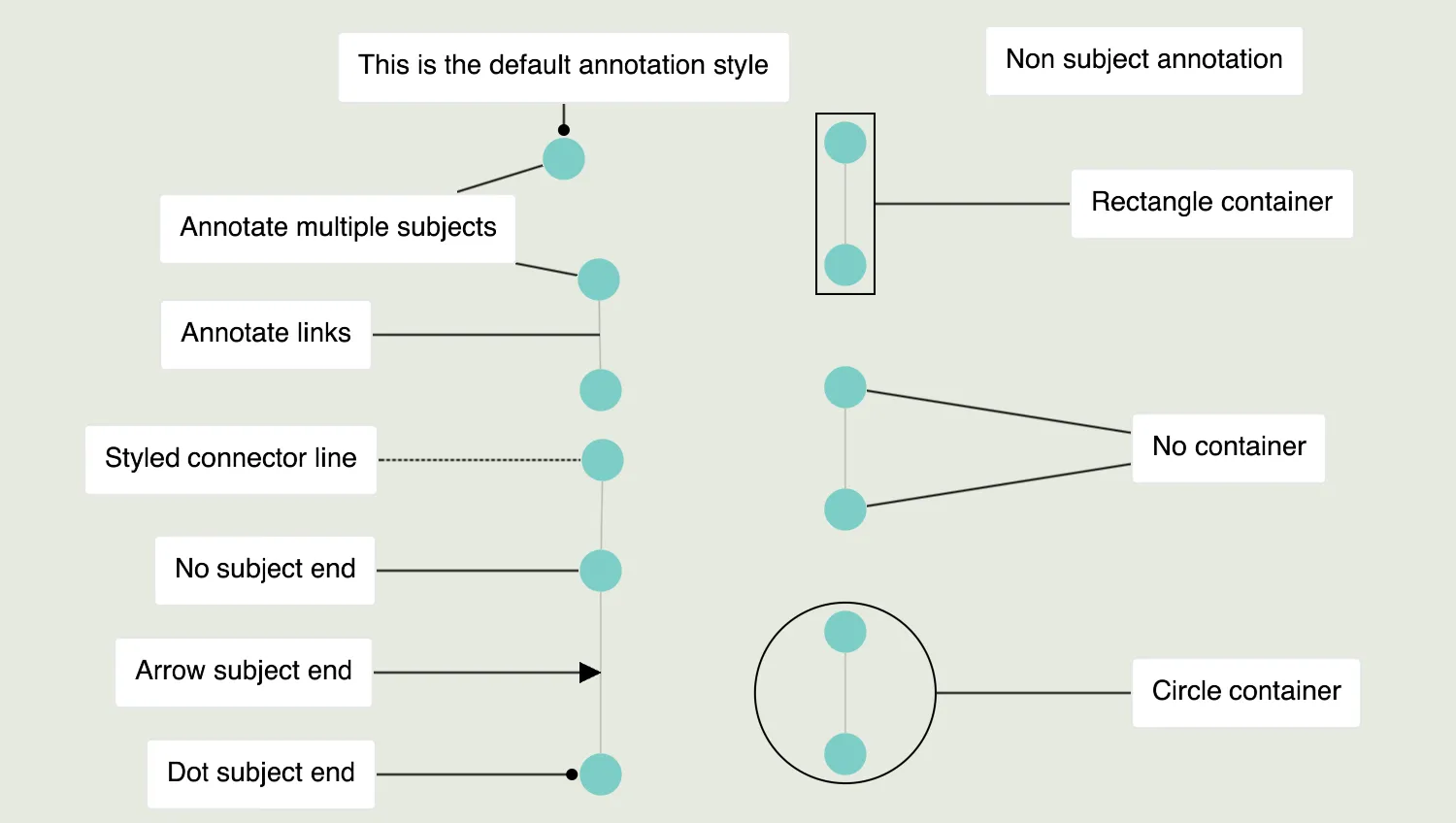
KeyLines annotations are a special type of a chart item that can annotate nodes, links, combos, or can stand as a free-standing chart annotation without any subjects.
Any annotations (with or without subjects) can be positioned using world coordinates, and stay fixed in place even during chart changes or view changes.
Annotations with subjects can also be placed relative to their subjects, and move to keep in their relative position even when a layout is run or when the subjects move.
Annotations have two main parts - a body to show information, styling elements or user controls and a connector to link the annotation to its subjects. You can read more in Annotations documentation and see more advanced examples of body styling in the Advanced Annotation Styles demo.
The connector further splits into a line, a subject end decoration and a container around subjects, all of which can be styled or disabled in the connectorStyle property.
Key functions used:
import KeyLines from "keylines";
import { data, itemsMap } from "./data";

let chart;

/* Formats the code snippets neatly in the display box on the right-hand side
   if no annotation is provided, prompt the user to select an annotation */
function prettyPrint(item) {
  const codeDisplayEl = document.getElementById("display");
  if (item?.type === "annotation") {
    const json = JSON.stringify(item, undefined, 1);
    codeDisplayEl.textContent = json;
  } else {
    codeDisplayEl.textContent = "Click an annotation";
  }
}

function initialiseInteractions() {
  chart.on("click", ({ id, preventDefault }) => {
    const item = itemsMap[id];
    if (item) {
      // Prevent item selection
      preventDefault();
    }
    prettyPrint(item);
  });
}

async function startKeyLines() {
  const options = {
    handMode: true,
    backColour: "rgb(230, 234, 224)",
    minZoom: 0.42,
    navigation: false,
  };

  chart = await KeyLines.create({ container: "klchart", options });
  await chart.load(data);
  await chart.zoom("fit");

  initialiseInteractions();
}

window.addEventListener("DOMContentLoaded", startKeyLines);function makeNode(id, x, y) {
return {
id,
type: "node",
c: "rgb(124, 205, 197)",
x,
y,
};
}
function makeLink(id1, id2) {
return {
id: `${id1}-${id2}`,
type: "link",
id1: id1,
id2: id2,
c: "rgb(166, 166, 166)",
};
}
const columnXMidPoints = {
1: 0,
2: 300,
};
const annotationDistance = 100;
const items = [
makeNode("n1", columnXMidPoints[1], 50),
makeNode("n2", columnXMidPoints[1], 200),
makeNode("n3", columnXMidPoints[1], 350),
makeLink("n2", "n3"),
makeNode("n4", columnXMidPoints[1], 650),
makeNode("n5", columnXMidPoints[1], 800),
makeLink("n4", "n5"),
makeNode("n6", columnXMidPoints[1], 1050),
makeLink("n5", "n6"),
makeNode("n7", columnXMidPoints[2], 275),
makeNode("n8", columnXMidPoints[2], 425),
makeLink("n7", "n8"),
makeNode("n9", columnXMidPoints[2], 575),
makeNode("n10", columnXMidPoints[2], 725),
makeLink("n9", "n10"),
makeNode("n11", columnXMidPoints[2], 875),
makeNode("n12", columnXMidPoints[2], 1025),
makeLink("n11", "n12"),
{
id: "a1",
type: "annotation",
subject: ["n1"],
t: {
t: "This is the default annotation style",
},
},
{
id: "a2",
type: "annotation",
subject: ["n1", "n2"],
position: {
angle: "w",
distance: annotationDistance - 50,
},
connectorStyle: {
subjectEnd: "none",
},
t: {
t: "Annotate multiple subjects",
},
},
{
id: "a3",
type: "annotation",
subject: ["n2-n3"],
position: {
angle: "w",
distance: annotationDistance,
},
connectorStyle: {
subjectEnd: "none",
},
t: {
t: "Annotate links",
},
},
{
id: "a4",
type: "annotation",
subject: ["n4"],
position: {
angle: "w",
distance: annotationDistance,
},
connectorStyle: {
ls: "dashed",
subjectEnd: "none",
},
t: {
t: "Styled connector line",
},
},
{
id: "a5",
type: "annotation",
subject: ["n5"],
position: {
angle: "w",
distance: annotationDistance,
},
connectorStyle: {
subjectEnd: "none",
},
t: {
t: "No subject end",
},
},
{
id: "a6",
type: "annotation",
subject: ["n5-n6"],
position: {
angle: "w",
distance: annotationDistance,
},
connectorStyle: {
subjectEnd: "arrow",
},
t: {
t: "Arrow subject end",
},
},
{
id: "a7",
type: "annotation",
subject: ["n6"],
position: {
angle: "w",
distance: annotationDistance,
},
connectorStyle: {
subjectEnd: "dot",
},
t: {
t: "Dot subject end",
},
},
{
id: "a8",
type: "annotation",
subject: [],
position: {
x: columnXMidPoints[2],
y: 125,
},
t: {
t: "Non subject annotation",
},
},
{
id: "a9",
type: "annotation",
subject: ["n7", "n8"],
position: {
angle: "e",
distance: annotationDistance,
},
connectorStyle: {
container: "rectangle",
subjectEnd: "none",
},
t: {
t: "Rectangle container",
},
},
{
id: "a10",
type: "annotation",
subject: ["n9", "n10"],
position: {
angle: "e",
distance: annotationDistance,
},
connectorStyle: {
container: "none",
subjectEnd: "none",
},
t: {
t: "No container",
},
},
{
id: "a11",
type: "annotation",
subject: ["n11", "n12"],
position: {
angle: "e",
distance: annotationDistance,
},
connectorStyle: {
container: "circle",
subjectEnd: "none",
},
t: {
t: "Circle container",
},
},
];
export const itemsMap = {};
items.forEach((item) => (itemsMap[item.id] = item));
export const data = {
type: "LinkChart",
items,
};<!doctype html>
<html lang="en">
<head>
<meta charset="utf-8">
<title>Annotations Basics</title>
<link rel="stylesheet" type="text/css" href="@ci/theme/kl/css/keylines.css">
<link
rel="stylesheet"
type="text/css"
href="@ci/theme/kl/css/minimalsdk.css"
>
<link
rel="stylesheet"
type="text/css"
href="@ci/theme/kl/css/sdk-layout.css"
>
<link rel="stylesheet" type="text/css" href="@ci/theme/kl/css/demo.css">
<link
rel="stylesheet"
type="text/css"
href="@ci/theme/kl/css/examples-chrome.css"
>
</head>
<body>
<div class="chart-wrapper demo-cols">
<div id="lhs" class="flex1">
<div
id="lhsVisual"
class="toggle-content is-visible"
style="width: 100%; height: 100%"
>
<div id="klchart" class="klchart"></div>
</div>
</div>
<div class="rhs citext" id="demorhscontent">
<div class="tab-content-panel">
<div id="controlsTab" class="toggle-content is-visible tabcontent">
<form id="rhsForm" autocomplete="off" onsubmit="return false;">
<div class="cicontent">
<p>Click any annotation to view its source code.</p>
<p>
Pan and zoom the chart and drag the nodes to see how
annotations respond to changes.
</p>
<pre
id="display"
style="
-webkit-user-select: text;
-khtml-user-select: text;
-moz-user-select: text;
-ms-user-select: text;
word-break: keep-all;
"
>
Click an annotation</pre>
</div>
</form>
</div>
</div>
</div>
</div>
<script type="module" src="./code.js"></script>
</body>
</html>