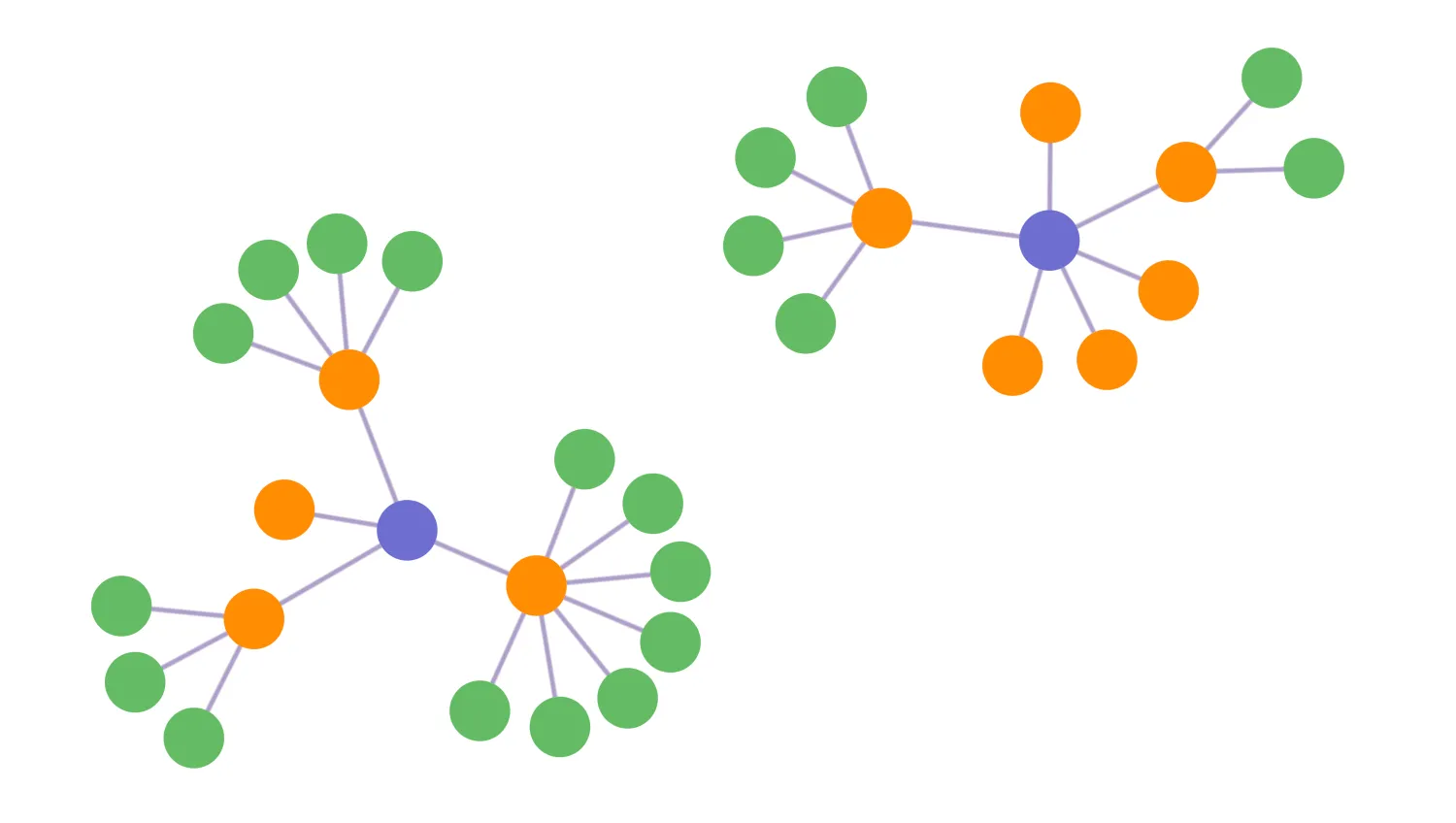
Layouts give spatial positions to nodes to help with pattern recognition and other user interactions.
Organic
The default layout, highly optimised for great performance on large datasets. The organic layout excels at untangling big networks and intuitively adapts to updates in the network with as little changes to the overall graph as possible.
Sequential
Arranges nodes in a way that minimises link crossings and makes the most of the available screen space. Useful when nodes are grouped in distinct levels, with a clear sequence of links from one level to the next. Learn more in the Sequential Layouts demo.
Radial
Gives an 'egocentric' view of the network, best thought of as a circular tree-like structure. Nodes are placed in concentric rings based on how well connected they are to a specified node, with better connected items closer to the centre. This layout is useful for seeing the relationships of individual nodes.
Structural
Groups nodes that are linked to the same set of nodes together. Useful with data with a complex structure.
Key function used:
import KeyLines from "keylines";
import { data } from "./data";

let chart;
const orientationSelect = document.getElementById("orientation");
const tightnessSlider = document.getElementById("slider");

// Set nodes 2 & 5 to be the top of sequential layout and centre of radial layout
const top = ["2", "5"];

// Gets the selected layout name
function getLayoutName() {
  return document.querySelector('input[name="layoutName"]:checked').value;
}

function layout() {
  // Use the currently selected layout name and options for the layout
  const layoutName = getLayoutName();
  const orientation =
    orientationSelect.options[orientationSelect.selectedIndex].value;
  const tightness = parseFloat(tightnessSlider.value);

  let options;
  switch (layoutName) {
    case "radial":
      options = { top, tightness };
      break;
    case "sequential":
      options = { top, orientation, tightness };
      break;
    default:
      options = { tightness };
      break;
  }
  chart.layout(layoutName, options);
}

function initialiseInteractions() {
  // Run a layout based on current selected menu options
  document.getElementById("layout").addEventListener("click", layout);

  // Run applicable layout when orientation selection changes
  orientationSelect.addEventListener("change", () => {
    if (getLayoutName() === "sequential") {
      layout();
    }
  });

  // Run a layout when tightness selection changes and update the menu display
  tightnessSlider.addEventListener("change", () => {
    document.getElementById("tightnessValue").innerHTML =
      tightnessSlider.value.toString();
    layout();
  });
}

async function loadKeyLines() {
  const options = {
    drag: {
      links: false,
    },
    logo: { u: "/public/images/Logo.png" },
    handMode: true,
    selectedNode: {
      b: "#082C1A",
      bw: 5,
    },
  };
  chart = await KeyLines.create({ container: "klchart", options });
  chart.load(data);
  chart.layout();
  initialiseInteractions();
}

window.addEventListener("DOMContentLoaded", loadKeyLines);const nodeBorder = { b: "#19854D", bw: 2 };
const nodeStyles = [
{ c: "#105934", ...nodeBorder },
{ c: "#29de81", ...nodeBorder },
{ c: "#caf7e0", ...nodeBorder },
];
const linkStyle = { c: "#19854D", w: 2, off: 0 };
export const data = {
type: "LinkChart",
items: [
{
type: "link",
id: "3-5",
id1: "3",
id2: "5",
...linkStyle,
},
{
type: "link",
id: "3-7",
id1: "3",
id2: "7",
...linkStyle,
},
{
type: "link",
id: "3-9",
id1: "3",
id2: "9",
...linkStyle,
},
{
type: "link",
id: "3-11",
id1: "3",
id2: "11",
...linkStyle,
},
{
type: "link",
id: "5-15",
id1: "5",
id2: "15",
...linkStyle,
},
{
type: "link",
id: "5-23",
id1: "5",
id2: "23",
...linkStyle,
},
{
type: "link",
id: "5-29",
id1: "5",
id2: "29",
...linkStyle,
},
{
type: "link",
id: "15-13",
id1: "15",
id2: "13",
...linkStyle,
},
{
type: "link",
id: "15-17",
id1: "15",
id2: "17",
...linkStyle,
},
{
type: "link",
id: "15-19",
id1: "15",
id2: "19",
...linkStyle,
},
{
type: "link",
id: "15-21",
id1: "15",
id2: "21",
...linkStyle,
},
{
type: "link",
id: "29-35",
id1: "29",
id2: "35",
...linkStyle,
},
{
type: "link",
id: "29-25",
id1: "29",
id2: "25",
...linkStyle,
},
{
type: "link",
id: "29-27",
id1: "29",
id2: "27",
...linkStyle,
},
{
type: "link",
id: "29-31",
id1: "29",
id2: "31",
...linkStyle,
},
{
type: "link",
id: "29-33",
id1: "29",
id2: "33",
...linkStyle,
},
{
type: "link",
id: "29-37",
id1: "29",
id2: "37",
...linkStyle,
},
{
type: "link",
id: "29-39",
id1: "29",
id2: "39",
...linkStyle,
},
{
type: "link",
id: "2-4",
id1: "2",
id2: "4",
...linkStyle,
},
{
type: "link",
id: "2-6",
id1: "2",
id2: "6",
...linkStyle,
},
{
type: "link",
id: "2-8",
id1: "2",
id2: "8",
...linkStyle,
},
{
type: "link",
id: "2-10",
id1: "2",
id2: "10",
...linkStyle,
},
{
type: "link",
id: "2-12",
id1: "2",
id2: "12",
...linkStyle,
},
{
type: "link",
id: "2-14",
id1: "2",
id2: "14",
...linkStyle,
},
{
type: "link",
id: "4-16",
id1: "4",
id2: "16",
...linkStyle,
},
{
type: "link",
id: "4-18",
id1: "4",
id2: "18",
...linkStyle,
},
{
type: "link",
id: "4-20",
id1: "4",
id2: "20",
...linkStyle,
},
{
type: "link",
id: "4-22",
id1: "4",
id2: "22",
...linkStyle,
},
{
type: "link",
id: "6-26",
id1: "6",
id2: "26",
...linkStyle,
},
{
type: "link",
id: "6-28",
id1: "6",
id2: "28",
...linkStyle,
},
{
type: "node",
id: "2",
...nodeStyles[0],
},
{
type: "node",
id: "3",
...nodeStyles[1],
},
{
type: "node",
id: "4",
...nodeStyles[1],
},
{
type: "node",
id: "5",
...nodeStyles[0],
},
{
type: "node",
id: "6",
...nodeStyles[1],
},
{
type: "node",
id: "7",
...nodeStyles[2],
},
{
type: "node",
id: "8",
...nodeStyles[1],
},
{
type: "node",
id: "9",
...nodeStyles[2],
},
{
type: "node",
id: "10",
...nodeStyles[1],
},
{
type: "node",
id: "11",
...nodeStyles[2],
},
{
type: "node",
id: "12",
...nodeStyles[1],
},
{
type: "node",
id: "13",
...nodeStyles[2],
},
{
type: "node",
id: "14",
...nodeStyles[1],
},
{
type: "node",
id: "15",
...nodeStyles[1],
},
{
type: "node",
id: "16",
...nodeStyles[2],
},
{
type: "node",
id: "17",
...nodeStyles[2],
},
{
type: "node",
id: "18",
...nodeStyles[2],
},
{
type: "node",
id: "19",
...nodeStyles[2],
},
{
type: "node",
id: "20",
...nodeStyles[2],
},
{
type: "node",
id: "21",
...nodeStyles[2],
},
{
type: "node",
id: "22",
...nodeStyles[2],
},
{
type: "node",
id: "23",
...nodeStyles[1],
},
{
type: "node",
id: "25",
...nodeStyles[2],
},
{
type: "node",
id: "26",
...nodeStyles[2],
},
{
type: "node",
id: "27",
...nodeStyles[2],
},
{
type: "node",
id: "28",
...nodeStyles[2],
},
{
type: "node",
id: "29",
...nodeStyles[1],
},
{
type: "node",
id: "31",
...nodeStyles[2],
},
{
type: "node",
id: "33",
...nodeStyles[2],
},
{
type: "node",
id: "35",
...nodeStyles[2],
},
{
type: "node",
id: "37",
...nodeStyles[2],
},
{
type: "node",
id: "39",
...nodeStyles[2],
},
],
};<!doctype html>
<html lang="en">
<head>
<meta charset="utf-8">
<title>Layouts</title>
<link rel="stylesheet" type="text/css" href="@ci/theme/kl/css/keylines.css">
<link
rel="stylesheet"
type="text/css"
href="@ci/theme/kl/css/minimalsdk.css"
>
<link
rel="stylesheet"
type="text/css"
href="@ci/theme/kl/css/sdk-layout.css"
>
<link rel="stylesheet" type="text/css" href="@ci/theme/kl/css/demo.css">
<link
rel="stylesheet"
type="text/css"
href="@ci/theme/kl/css/examples-chrome.css"
>
<link rel="stylesheet" href="./style.css">
</head>
<body>
<div class="chart-wrapper demo-cols">
<div id="lhs" class="flex1">
<div
id="lhsVisual"
class="toggle-content is-visible"
style="width: 100%; height: 100%"
>
<div id="klchart" class="klchart"></div>
</div>
</div>
<div class="rhs citext" id="demorhscontent">
<div class="tab-content-panel">
<div id="controlsTab" class="toggle-content is-visible tabcontent">
<p>
Try out different layouts by selecting one from the list below.
</p>
<form id="rhsForm" autocomplete="off" onsubmit="return false;">
<div class="cicontent">
<legend>Layout Name</legend>
<fieldset id="layoutfieldset">
<label class="radio"
><input
type="radio"
name="layoutName"
value="organic"
checked="checked"
>
Organic</label
><label class="radio"
><input type="radio" name="layoutName" value="sequential">
Sequential</label
><label class="radio"
><input type="radio" name="layoutName" value="radial">
Radial</label
><label class="radio"
><input type="radio" name="layoutName" value="structural">
Structural</label
>
</fieldset>
<fieldset>
<input
class="btn"
type="button"
value="Run layout"
id="layout"
>
</fieldset>
<fieldset><legend>Options</legend></fieldset>
<fieldset>
<label
>Tightness: <strong id="tightnessValue">5</strong>
<input
id="slider"
type="range"
min="0"
max="10"
value="5"
></label
>
</fieldset>
<fieldset>
<label>Orientation (Sequential)</label
><select class="input-block-level" id="orientation">
<option value="down">Down</option>
<option value="right">Right</option>
<option value="up">Up</option>
<option value="left">Left</option>
</select>
</fieldset>
</div>
</form>
</div>
</div>
</div>
</div>
<script type="module" src="./code.js"></script>
</body>
</html>/* --- layouts.css --- */
input[type="range"] {
width: 100%;
margin-bottom: 10px;
}
.label-alpha,
.label-beta {
margin-left: 12px;
}
#layoutfieldset {
margin-left: 10px;
}
fieldset {
width: 90%;
margin-top: 5px;
}
fieldset .radio {
display: block;
padding-left: 0px;
}