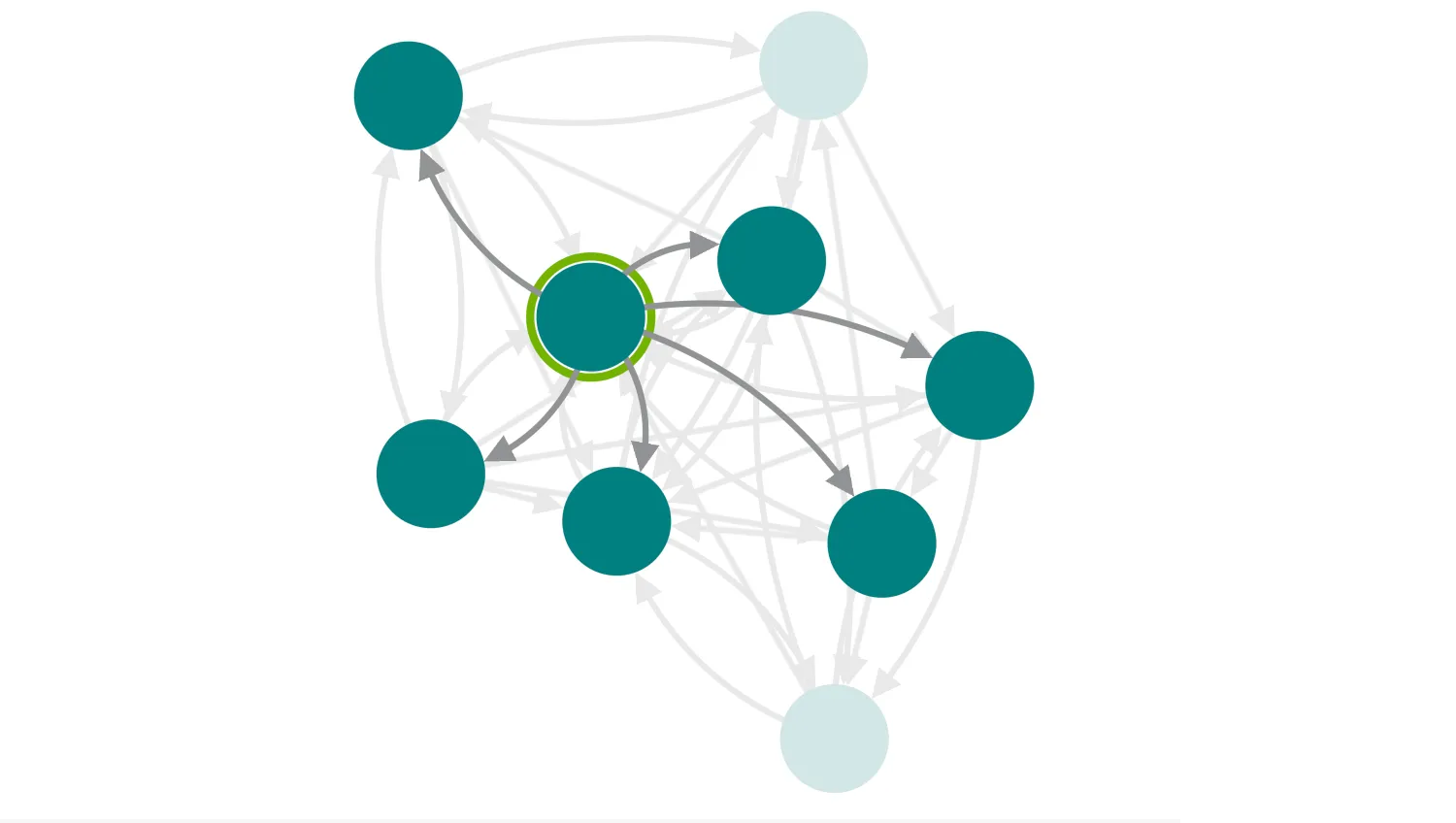
This demo illustrates KeyLines' ability to 'highlight' selected chart elements to provide visual separation between them and other items of interest.
The selected node and any neighbours it points to are foregrounded, while all others are put in the background. You can fully customise the appearance of selected items to a style that suits your needs.
In congested charts, foregrounding items with chart.foreground can be an effective way to improve the intelligibility and usability of a chart.
Key functions used:
import KeyLines from "keylines";
import { data } from "./data";

let chart;

const appearanceStyles = {
  Default: {
    selectionColour: "rgb(114, 179, 0)",
    selectedLink: null,
    selectedNode: null,
  },
  Red: {
    selectionColour: "rgb(220,20,60)",
    selectedLink: null,
    selectedNode: null,
  },
  Blue: {
    selectedLink: {
      c: "rgb(0,0,204)",
    },
    selectedNode: {
      b: "rgb(0,0,204)",
      bs: "dashed",
      c: "rgb(0,102,204)",
      ha0: {
        r: 37,
        w: 4,
        c: "rgb(153,204,255)",
      },
    },
  },
};

function createEventHandlers() {
  // Update the background effect when the selection changes
  chart.on("selection-change", () => {
    updateSelection(chart.selection());
  });

  // Apply selection theme and ensure a node selection
  const appearanceEl = document.getElementById("appearance");
  appearanceEl.addEventListener("change", () => {
    const options = appearanceStyles[appearanceEl.value];
    chart.options(options);
    if (chart.selection().length === 0) {
      // If there's no selection, force node 7 to be selected
      updateSelection(chart.selection("7"));
    }
  });
}

function updateSelection(itemIds) {
  const nodeIds = itemIds.filter((id) => !id.match("-"));
  if (nodeIds.length === 0) {
    // Clicked on background - restore all the elements in the foreground
    chart.foreground(() => true);
  } else {
    const selectedItem = chart.getItem(nodeIds);
    // Ensure we have clicked on a node, not the navigation control
    if (selectedItem) {
      // Foreground the selected item and outbound neighbours
      const result = chart.graph().neighbours(nodeIds, { direction: "from" });
      const neighbours = nodeIds.concat(result.nodes, result.links);
      chart.foreground((item) => neighbours.includes(item.id), { type: "all" });
    }
  }
}

async function loadKeyLines() {
  const options = {
    logo: { u: "/public/images/Logo.png" },
    handMode: true,
  };
  chart = await KeyLines.create({ container: "klchart", options });
  chart.load(data);
  chart.layout("organic", { tightness: 3 });
  createEventHandlers();
}

window.addEventListener("DOMContentLoaded", loadKeyLines);export const data = {
type: "LinkChart",
items: [
{
type: "node",
id: "1",
c: "teal",
},
{
type: "node",
id: "2",
c: "teal",
},
{
type: "node",
id: "3",
c: "teal",
},
{
type: "node",
id: "4",
c: "teal",
},
{
type: "node",
id: "5",
c: "teal",
},
{
type: "node",
id: "6",
c: "teal",
},
{
type: "node",
id: "7",
c: "teal",
},
{
type: "node",
id: "8",
c: "teal",
},
{
type: "node",
id: "9",
c: "teal",
},
{
type: "link",
w: "3",
a2: "true",
id1: "2",
id2: "8",
id: "2-8",
},
{
type: "link",
w: "3",
a2: "true",
id1: "2",
id2: "5",
id: "2-5",
},
{
type: "link",
w: "3",
a2: "true",
id1: "2",
id2: "4",
id: "2-4",
},
{
type: "link",
w: "3",
a2: "true",
id1: "2",
id2: "3",
id: "2-3",
},
{
type: "link",
w: "3",
a2: "true",
id1: "1",
id2: "8",
id: "1-8",
},
{
type: "link",
w: "3",
a2: "true",
id1: "1",
id2: "7",
id: "1-7",
},
{
type: "link",
w: "3",
a2: "true",
id1: "1",
id2: "5",
id: "1-5",
},
{
type: "link",
w: "3",
a2: "true",
id1: "1",
id2: "4",
id: "1-4",
},
{
type: "link",
w: "3",
a2: "true",
id1: "1",
id2: "3",
id: "1-3",
},
{
type: "link",
w: "3",
a2: "true",
id1: "3",
id2: "9",
id: "3-9",
},
{
type: "link",
w: "3",
a2: "true",
id1: "3",
id2: "8",
id: "3-8",
},
{
type: "link",
w: "3",
a2: "true",
id1: "3",
id2: "4",
id: "3-4",
},
{
type: "link",
w: "3",
a2: "true",
id1: "3",
id2: "2",
id: "3-2",
},
{
type: "link",
w: "3",
a2: "true",
id1: "4",
id2: "8",
id: "4-8",
},
{
type: "link",
w: "3",
a2: "true",
id1: "4",
id2: "5",
id: "4-5",
},
{
type: "link",
w: "3",
a2: "true",
id1: "4",
id2: "2",
id: "4-2",
},
{
type: "link",
w: "3",
a2: "true",
id1: "4",
id2: "1",
id: "4-1",
},
{
type: "link",
w: "3",
a2: "true",
id1: "5",
id2: "8",
id: "5-8",
},
{
type: "link",
w: "3",
a2: "true",
id1: "5",
id2: "7",
id: "5-7",
},
{
type: "link",
w: "3",
a2: "true",
id1: "5",
id2: "4",
id: "5-4",
},
{
type: "link",
w: "3",
a2: "true",
id1: "5",
id2: "3",
id: "5-3",
},
{
type: "link",
w: "3",
a2: "true",
id1: "5",
id2: "2",
id: "5-2",
},
{
type: "link",
w: "3",
a2: "true",
id1: "6",
id2: "9",
id: "6-9",
},
{
type: "link",
w: "3",
a2: "true",
id1: "6",
id2: "8",
id: "6-8",
},
{
type: "link",
w: "3",
a2: "true",
id1: "6",
id2: "7",
id: "6-7",
},
{
type: "link",
w: "3",
a2: "true",
id1: "6",
id2: "5",
id: "6-5",
},
{
type: "link",
w: "3",
a2: "true",
id1: "6",
id2: "4",
id: "6-4",
},
{
type: "link",
w: "3",
a2: "true",
id1: "6",
id2: "3",
id: "6-3",
},
{
type: "link",
w: "3",
a2: "true",
id1: "7",
id2: "8",
id: "7-8",
},
{
type: "link",
w: "3",
a2: "true",
id1: "7",
id2: "6",
id: "7-6",
},
{
type: "link",
w: "3",
a2: "true",
id1: "7",
id2: "4",
id: "7-4",
},
{
type: "link",
w: "3",
a2: "true",
id1: "7",
id2: "1",
id: "7-1",
},
{
type: "link",
w: "3",
a2: "true",
id1: "8",
id2: "9",
id: "8-9",
},
{
type: "link",
w: "3",
a2: "true",
id1: "8",
id2: "7",
id: "8-8",
},
{
type: "link",
w: "3",
a2: "true",
id1: "8",
id2: "6",
id: "8-6",
},
{
type: "link",
w: "3",
a2: "true",
id1: "8",
id2: "5",
id: "8-5",
},
{
type: "link",
w: "3",
a2: "true",
id1: "8",
id2: "4",
id: "8-4",
},
{
type: "link",
w: "3",
a2: "true",
id1: "8",
id2: "3",
id: "8-3",
},
{
type: "link",
w: "3",
a2: "true",
id1: "9",
id2: "8",
id: "9-8",
},
{
type: "link",
w: "3",
a2: "true",
id1: "9",
id2: "4",
id: "9-4",
},
{
type: "link",
w: "3",
a2: "true",
id1: "9",
id2: "2",
id: "9-2",
},
{
type: "link",
w: "3",
a2: "true",
id1: "9",
id2: "1",
id: "9-1",
},
],
};<!doctype html>
<html lang="en">
<head>
<meta charset="utf-8">
<title>Selecting Items</title>
<link rel="stylesheet" type="text/css" href="@ci/theme/kl/css/keylines.css">
<link
rel="stylesheet"
type="text/css"
href="@ci/theme/kl/css/minimalsdk.css"
>
<link
rel="stylesheet"
type="text/css"
href="@ci/theme/kl/css/sdk-layout.css"
>
<link rel="stylesheet" type="text/css" href="@ci/theme/kl/css/demo.css">
<link
rel="stylesheet"
type="text/css"
href="@ci/theme/kl/css/examples-chrome.css"
>
</head>
<body>
<div class="chart-wrapper demo-cols">
<div id="lhs" class="flex1">
<div
id="lhsVisual"
class="toggle-content is-visible"
style="width: 100%; height: 100%"
>
<div id="klchart" class="klchart"></div>
</div>
</div>
<div class="rhs citext" id="demorhscontent">
<div class="tab-content-panel">
<div id="controlsTab" class="toggle-content is-visible tabcontent">
<p>Shows how to use background items to explore dense networks.</p>
<form id="rhsForm" autocomplete="off" onsubmit="return false;">
<div class="cicontent">
<p>
Click on a node to focus on their out-bound connections. You
can customise the appearance of selected items with the menu
below.
</p>
</div>
<fieldset>
<label
class="control-label"
for="appearance"
style="margin-top: 20px"
>Selection appearance:</label
><select class="input-block-level" id="appearance">
<option value="Default">Default</option>
<option value="Red">Red</option>
<option value="Blue">Blue</option>
</select>
</fieldset>
</form>
</div>
</div>
</div>
</div>
<script type="module" src="./code.js"></script>
</body>
</html>